| The MSBLAST.A worm infects machines via network connections. It can attack entire networks of computers or one single computer connected to the Internet. The worm exploits a known windows vulnerability that is easily patched, however few systems seem to have this patch installed. It attacks Windows 2000 and Windows XP machines and exploits the DCOM RPC Vulnerablity. Depending on the system date it will start a Denial of Service attack against windowsupdate.com, this makes it difficult to download the needed patches and allow the worm to infect as many machines as it can before being disabled. However, as of August 15th, Microsoft decided to kill the windowsupdate.com domain to lessen the impact from this denial of service attack. MSBLAST can also cause widespread system instability including but not limited to Windows Blue screens, out of memory errors, changes to Control Panel, inability to use functions in browser, and many more oddities. |
Download the Windows patches for this vulnerability by clicking on the links below:
These Windows vulnerabilities are patched by using Windows Update to download all the critical updates for your system. However in some cases, people have reported getting an error 0x800A138F when trying to download updates. If you are receiving an error similar to this, read Marc Liron's excellent article about solving this at his updatexp.com website.
What is the DCOM Vulnerability?
The DCOM vulnerability in Windows 2000 and XP can allow an attacker to remotely compromise a computer running Microsoft® Windows® and gain complete control over it. The worm causes a buffer overrun in the Remote Procedure Call (RPC) service. When this service is terminated the virus infects the machine and then tries to infect other machines.
What are the Symptoms of the MSBLAST worm?
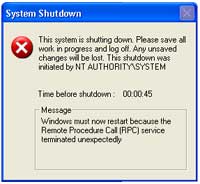
You'll see a screen similar to the one below when you are infected, this will countdown to zero and literally shut down the system completely. The warning will state "This shutdown was initiated by NT AUTHORITY\SYSTEM". The message will read
Windows must now restart because the Remote Procedure Call (RPC) service terminated unexpectedly.
You can disable this shutdown by following the steps below during the countdown
- Click on Start, Run
- Type in CMD and press ENTER
- Type in
the following command and press Enter
SHUTDOWN -A
This will terminate the shutdown, however in most cases the system may be to unstable to try to recover and may need to be rebooted anyway.
How Does MSBLAST Infect My Computer?
- The worm
creates a Mutex
named "BILLY." If the mutex
exists, the worm will exit.
- Adds the
value:
”windows auto update" = MSBLAST.EXE (variant A)
”windows auto update" = PENIS32.EXE (variant B)
”Microsoft Inet xp.." = TEEKIDS.EXE (variant C)
"Nonton Antivirus=mspatch.exe" (variant E)
"Windows Automation" = "mslaugh.exe" (variant F)
"www.hidro.4t.com"="enbiei.exe" (variant G)
to the registry key:
HKEY_LOCAL_MACHINE\SOFTWARE\Microsoft\Windows\CurrentVersion\Run
so that the worm runs when you start Windows.
- Calculates
the IP address, based on the following algorithm, 40% of the time:
Host IP: A.B.C.D
sets D equal to 0.
if C > 20, will subtract a random value less than 20.
Once calculated, the worm will start attempting to exploit the computer based on A.B.C.0, and then count up.
This means the Local Area Network will be infected almost immediately and become become saturated with port 135 requests prior to exiting the local subnet.
- Calculates
the IP address, based on many random numbers, 60% of the time:
A.B.C.D
set D equal to 0.
sets A, B, and C to random values between 0 and 255.
- Sends
data on TCP port 135 that may exploit the DCOM RPC vulnerability to
allow the following actions to occur on the vulnerable computer:
Create a hidden Cmd.exe remote shell that will listen on TCP port 4444.
NOTE: Due to the random nature of how the worm constructs the exploit data, it may cause computers to crash if it sends incorrect data. This can cause blue screens, out of memory errors, etc.
- Listens
on UDP port 69. When the worm receives a request, it will return the
Msblast.exe binary.
- Sends
the commands to the remote computer to reconnect to the infected host
and to download and run Msblast.exe.
- If the
current month is after August, or if the current date is after the
15th, the worm will perform a DoS on "windowsupdate.com."
With the current logic, the worm will activate the DoS attack on the 16th of this month, and continue until the end of the year.
The worm contains the following text, which is never displayed:
I
just want to say LOVE YOU SAN!!
billy gates why do you make this possible ? Stop making money and fix
your software!!
Windows 2000 Machines
On Windows 2000 machines, I have seen the Control Panel icons switch to the left pane, functions like FIND in the browser stop working, and many other oddities.
How Can I Remove the MSBLAST worm?
Follow these steps in removing the MSBLAST or MSBLASTER worm.
1) Disconnect your computer from the local area network or Internet
2) Terminate the running program
- Open the Windows Task Manager by either pressing CTRL+ALT+DEL, selecting the Processes tab or selecting Task Manager and then the process tab on WinNT/2000/XP machines.
- Locate one of the following programs (depending on variation), click on it and End Task or End Process
MSBLAST.EXE
PENIS32.EXE
TEEKIDS.EXE
MSPATCH.EXE
MSLAUGH.EXE
ENBIEI.EXE
- Close Task Manager
3) Install the patches for the DCOM RPC Exploit, you can download the patches from the links below before disconnecting
Windows 2000
Windows NT Server 4.0 and Windows NT Workstation 4.0Windows NT Server 4.0, Terminal Server Edition
Windows XP (64 bit) (server edition)
If you receive a "cryptographic service" error when you try to apply the patch, please read the following excellent article on how to fix this error:
4) Block access to TCP port 4444 at the firewall level, and then block the following ports, if they do not use the applications listed:
- TCP Port 135, "DCOM RPC"
- UDP Port 69, "TFTP"
5) Remove the Registry entries
- Click on Start, Run, Regedit
- In the left panel go to
HKEY_LOCAL_MACHINE>Software>Microsoft>Windows>Current Version>Run
- In the right panel, right-click and delete the following entry
”windows auto update" = MSBLAST.EXE (variant A)
”windows auto update" = PENIS32.EXE (variant B)
”Microsoft Inet xp.." = TEEKIDS.EXE (variant C)
"Nonton Antivirus"=MSPATCH.EXE (variant E)
"Windows Automation" = "mslaugh.exe" (variant F)
"www.hidro.4t.com"="enbiei.exe" (variant G)
- Close the Registry Editor
6) Delete the infected files (for Windows ME and XP remember to turn off System Restore before searching for and deleting these files to remove infected backed up files as well)
- Click
Start, point to Find or Search, and then click Files or Folders.
- Make
sure that "Look in" is set to (C:\WINDOWS).
- In the
"Named" or "Search for..." box, type, or copy and paste, the file names:
msblast*.* (or other filenames listed above)
- Click
Find Now or Search Now.
- Delete
the displayed files.
- Empty the Recycle bin, the worm can reinfect even if the files are in the recycle bin.
7) Reboot the computer, reconnect the network, and update your antivirus software, and run a thorough virus scan using your favorite antivirus program.
8) Now check for the worm again, if it returns, complete these steps once more until the virus is gone. With the patch in place, the virus wont be able to exploit the system, but sometimes it is difficult to remove the files for good.
For Automatic Removal of MSBLAST, download the Symantec removal tool, you'll still need to download the patches above and install them, however this removal tool will stop the MSBLAST program from running, remove the items in the registry, and delete the infected files.
You can find more information about this worm by visiting Symantec's or TrendMicro's pages on this worm
Microsoft's Page on What You Should Know About the Blaster worm

| Search PCHell.com |
|
| site search by freefind | advanced |
Tools for Removing Spyware, Adware, and Malware
PC HELL
Other Pages
Welchia (Dllhost.exe and SVCHost.exe) Worm Removal
Uninstall Antivir Instructions
How to Manually Run the Microsoft Malicious Software Removal Tool
Bloodhound.Exploit.6 Virus Removal
Backdoor SDBot.H Trojan Removal
iPadastic - News, Tutorials, Help, Tips, and Hints for the iPad
Download Hoyle Games
including Casino 3D, Card, Board, and Solitaire games.